Managing vehicle availability has become much more flexible. With the new Vehicle availability calendar, every rental vehicle now has its own availability schedule, allowing operators or vehicle owners to define exactly when a vehicle can be booked.
By default, vehicles remain available 24/7, but operators can switch to a custom schedule and configure recurring unavailable periods or make one-time availability adjustments directly from the calendar.
Key Capabilities
📅 24/7 availability by default
Newly added vehicles are automatically available around the clock. No additional setup is required.
🔄 Recurring weekly availability schedules
Configure custom weekly availability for each individual vehicle by defining one or multiple unavailable periods for every day of the week.
Navigation:
Vehicles → Select vehicle → Edit → Set availability
⚙️ Multiple unavailable periods per day
Need to block vehicles for maintenance, charging, cleaning, or personal use? Add as many unavailable time slots as needed for each day.
📆 One-time availability changes
Override the recurring schedule for a specific date without affecting the permanent weekly configuration. Perfect for holidays, temporary maintenance, or special events.
Navigation:
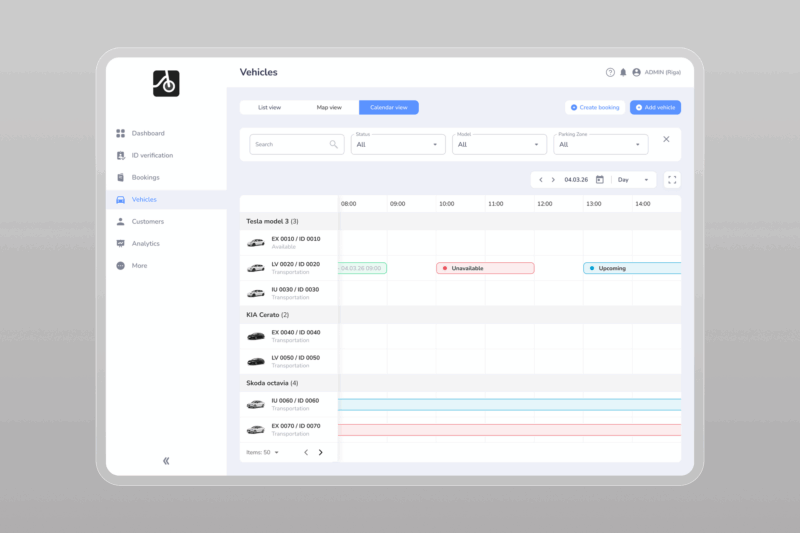
Vehicles → Calendar view → Click any available or unavailable time slot to add or edit
🔴 Visual availability overview
Unavailable periods are highlighted directly in the vehicle calendar, making it easy to identify when a vehicle can or cannot be booked.
🛡️ Booking conflict protection
To prevent scheduling issues, the system validates every availability change. If the selected period overlaps with an existing booking, the update cannot be saved and the operator will receive an error informing them that a booking already exists for that time.
How It Works
The feature combines two layers of availability:
- Recurring schedule – the vehicle’s permanent weekly availability pattern.
- Calendar exceptions – one-time changes that apply only to a specific date without modifying the recurring schedule.
For example, if a vehicle is normally unavailable every Wednesday from 10:00–12:00, you can temporarily extend, edit or reduce availability for a single Wednesday while leaving all future Wednesdays unchanged.
Why It Matters
P2P rental businesses often manage vehicles with different owner preferences and operating hours. This feature gives operators the flexibility to support virtually any availability scenario while keeping bookings accurate and preventing scheduling conflicts.
Whether you’re managing a small peer-to-peer fleet or thousands of rental vehicles, the new vehicle availability calendar makes availability management significantly easier and more reliable.
This article was originally published by ATOM Mobility.