2025 has been a defining year for shared mobility, digital rentals, and ride-hailing. Competition is stronger, operational costs are rising, and users expect instant, reliable digital experiences. Operators who succeed are the ones who automate more, reduce friction, and stay flexible with hardware, payments, and integrations.
This year, ATOM Mobility shipped a series of features designed to help operators achieve exactly that:
grow revenue, reduce costs, improve fleet quality, and scale into new markets with less complexity.
Here are the 10 most impactful (out of more than 70) features ATOM Mobility released in 2025, and why they matter.
1. OpenAPI (supported by all 3 modules – vehicle sharing, digital rental and ride-hail)
The launch of ATOM’s OpenAPI marks a major step forward for operators seeking greater flexibility, automation, and integration possibilities.
What it is
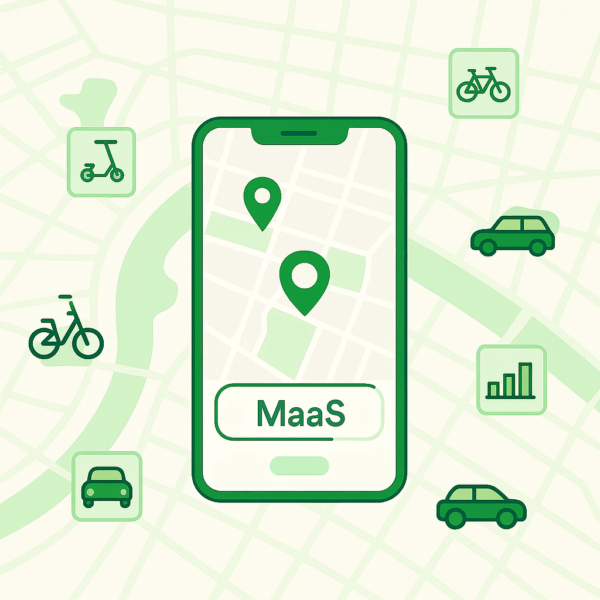
A fully documented API layer allowing operators and partners to build custom flows, integrations, booking systems, analytics dashboards, or MaaS connections on top of ATOM Mobility.
Who it helps
All verticals: micromobility, car-sharing, moped sharing, rentals, ride-hail, and enterprise partners.
How it works
OpenAPI enables third-party developers to build on top of the ATOM Mobility infrastructure, allowing seamless integrations with external apps, internal tools, and automated workflows. With OpenAPI, operators can extend their service in almost any direction: a partner app (like FreeNow or Uber) can show your vehicles, unlock them, and process payments on your behalf; or internal systems can trigger automated actions – such as sending a survey email after every completed ride. The possibilities are nearly unlimited, giving operators full flexibility to innovate and scale however they choose.
Why it matters
- Enables deeper integrations with partners and local platforms
- Supports custom business logic and automations
- Makes it easier to enter new markets with local-specific requirements
- Opens the door to MaaS distribution and enterprise collaborations
2. Sign-In with Apple & Google – A smoother first-time user experience (all modules)
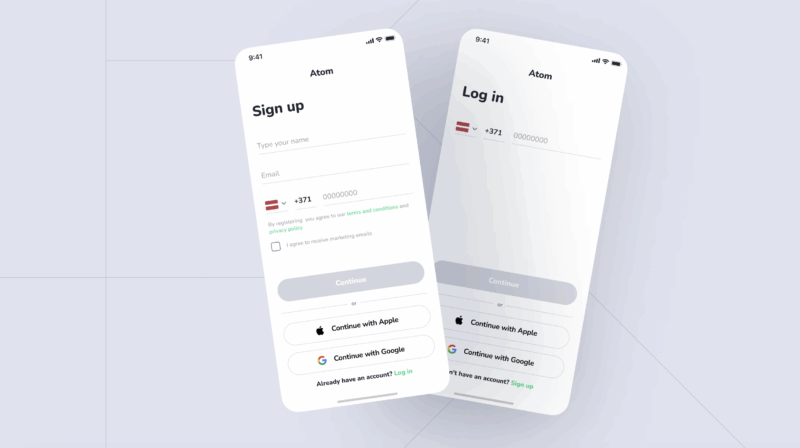
Across mobility, the registration flow is often the first point of friction. ATOM Mobility introduced modern authentication options to simplify onboarding.
What it is
One-tap sign-in using Apple ID or Google Account instead of relying solely on SMS verification.
Who it helps
All operators – especially those targeting tourists, or markets with unreliable SMS delivery.
How it works
When creating a new account or logging in, users can choose to log in/register using Apple ID or Google Account – this will allow account creation in just 2 taps.
Why it matters
- Faster user onboarding experience -> happier rider -> more frequent rides
- Fewer SMS-related issues (and lower SMS related costs) and failed verifications
- Reduced support load from login problems
3. Multipurpose side menu button (all modules)
What it is
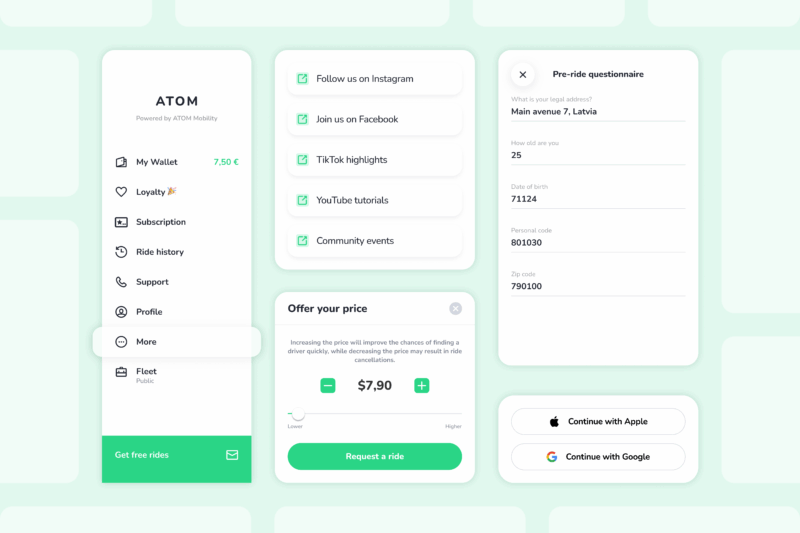
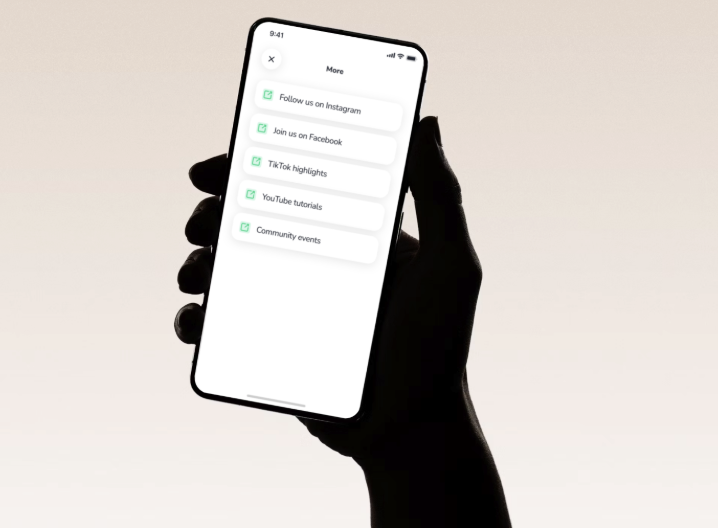
A customizable slot in the app menu where operators can add up to five external links – websites, ecommerce pages, tour pages, extra FAQ pages, social media, partner offers, etc.
How it works
- Enable in Settings → System preferences → External links
- Add titles + URLs
- Links automaticaly appear in the app under “More”
Value for operators
- A space where you can display any information you consider important for the user
- Supports cross-promotion and partnership campaigns
- Allows communication updates without app releases
- Creates additional monetisation opportunities, such as launching your own e-commerce or merchandise shop
4. Pre-ride questionnaire (all modules)
What it is
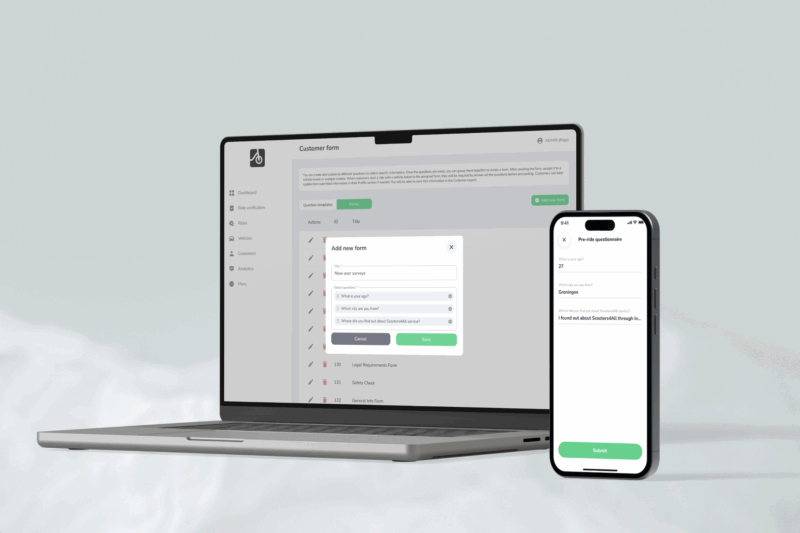
A form that users must complete before starting a ride – ideal for compliance, reporting, invoicing, or gathering important data.
Who it helps
Operators needing regulatory data, reporting, consent collection, or structured user feedback.
How it works
Create a question (or several) in “Customer form” -> Group questions into a pre-ride form -> Assign a form to specific vehicle models/classes.
Once completed, the customer must answer predefined questions before starting the ride. Their responses appear in both customer and ride exports. For example, you can ask for a personal ID code, legal address, or any other required information.
Value for operators
- Helps meet regulatory or municipal requirements
- Ensures correct invoicing details
- Provides a structured way to capture essential user data
5. Driver revenue auto-distribution (Stripe & Adyen, ride-hail)
What it is
Automatic payout splitting: driver earnings go to the driver’s payout account, and platform commission goes to the operator – all processed automatically after each ride.
Who it helps
Ride-hail operators using Stripe or Adyen.
How it works
- Operator has a Stripe/Adyen merchant account
- Drivers onboard as payout recipients
- After completed rides, payouts split automatically
- Supports mixed payment methods (cash and non-cash)
Value for operators
- Reduces manual payout work
- Minimises accounting errors
- Improves driver experience through transparency and instant pay out
- Makes scaling easier when the driver base grow
6. Set a manual vehicle location (vehicle sharing & digital rental)
What it is
A tool to override or manually set a vehicle’s GPS position when IoT data is unavailable (no IoT placed on the vehicle at all) or inaccurate.
Who it helps
Operators with underground parking, poor GPS coverage, or long-term rentals without IoT can use this setup. A typical scenario is long-term bike rental without IoT: the user completes ID verification, payment, and booking in the app, then sees the vehicle assigned to a predefined location (station) where it is picked up and later returned. This serves as a workaround for vehicles that do not support IoT or where adding IoT device is too costly.
How it works
Edit vehicle → update “Location” field. The system assumes this as the correct coordinate. Works for individual vehicles or via mass import.
Value for operators
- Avoids user frustration when vehicles appear in the wrong location
- Supports business models with fleets operating without IoT devices
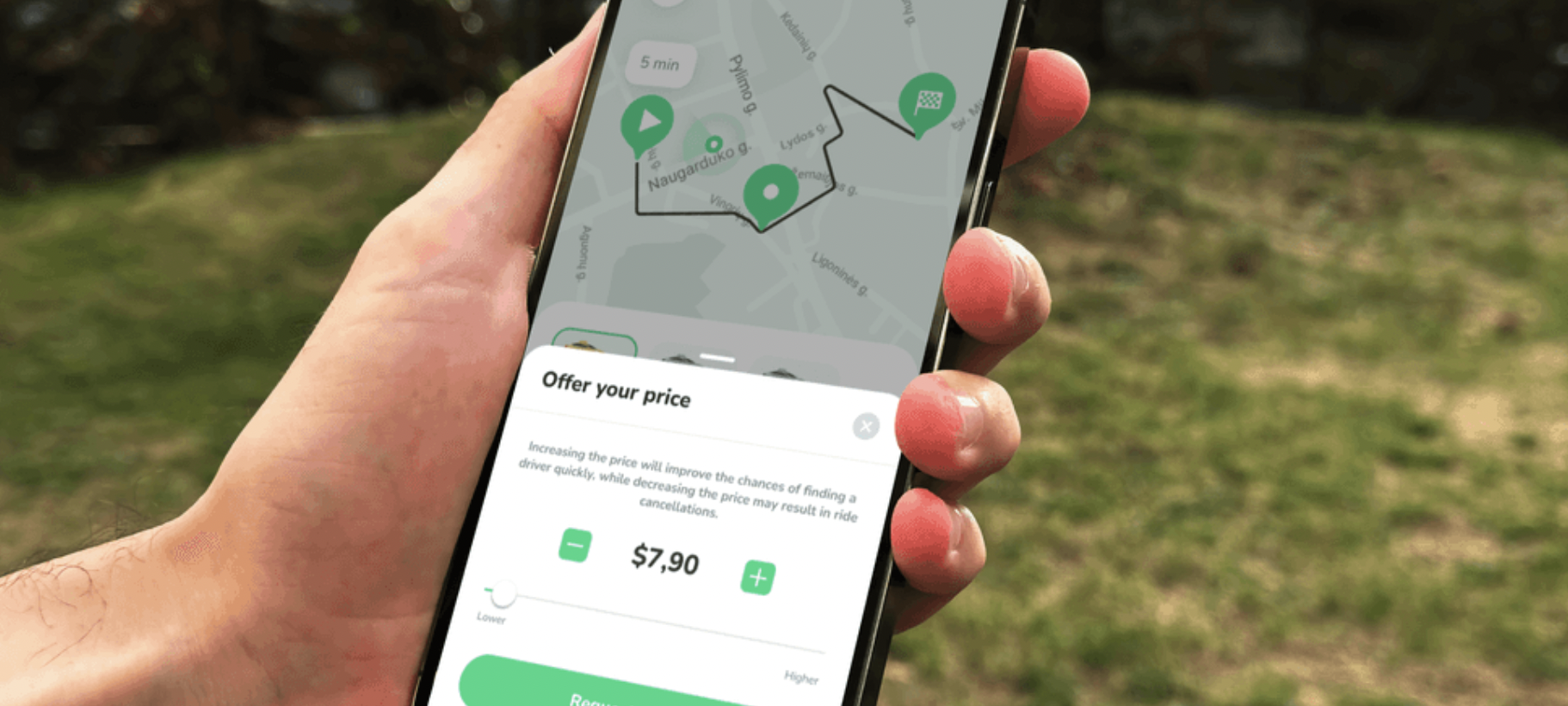
7. Offer your price – rider-controlled pricing (ride-hailing)
What it is
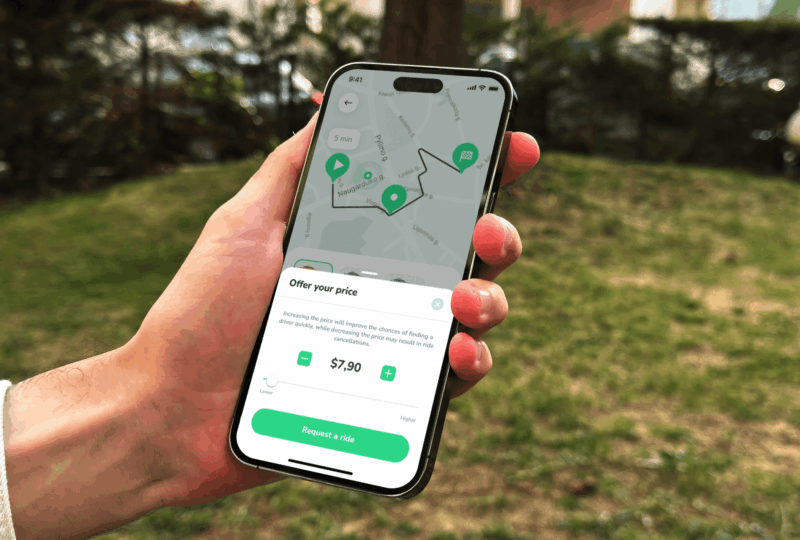
A flexible pricing feature that lets passengers propose their own fare – higher or lower than the system-calculated price, within limits set by the operator. Drivers see the offer instantly and can choose to accept or reject it.
Who it helps
Ride-hailing operators in competitive, price-sensitive, or highly dynamic markets where price shifts demand quickly.
How it works
When requesting a ride, the user selects “Offer your price”. A slider or +/– buttons allow them to adjust the fare within operator-defined boundaries. If the user lowers the price, the app explains that the offer may reduce the chance of driver acceptance.
Drivers see a clear banner showing whether the rider is offering more or less than the standard fare. Drivers can accept or decline based on their preference.
Operators can enable or disable the feature per vehicle class.
Why it matters
- Creates a clear differentiator in markets dominated by fixed-fare competitors
- Helps convert riders who compare multiple apps before booking
- Gives drivers more control over their earnings and decisions, improving transparency and satisfaction
- Supports better ride matching during off-peak hours or less profitable routes
- Allows operators to experiment with more flexible pricing strategies without changing their core fare model
8. Web-booker for digital rental – frictionless bookings directly from your website (digital rental)
What it is
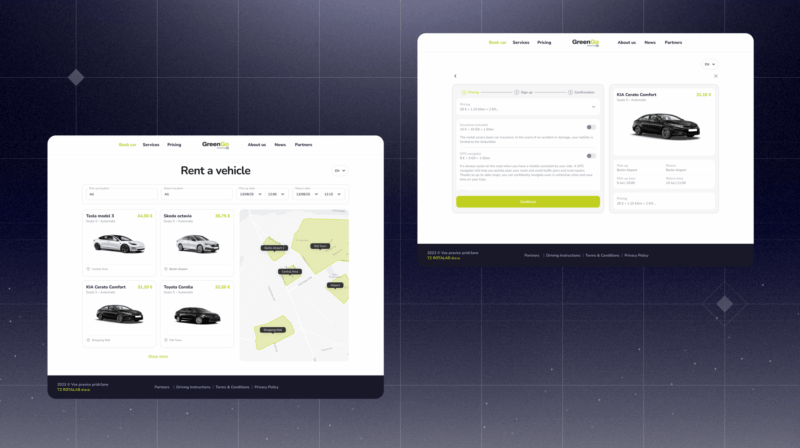
A lightweight, embeddable booking widget that lets customers reserve a rental vehicle directly from your website – without installing the mobile app first. It’s designed to capture spontaneous bookings, convert website visitors, and unify online and in-app rental experiences.
Who it helps
Car, moped, and bike rental operators, as well as hospitality and tourism partners such as hotels, resorts, coworking spaces, real-estate developers, and travel service providers.
How it works
Every operator receives a branded rental URL: merchantname.atommobility.com/rent
Users select their area, vehicle type, and rental period directly in the widget. Once confirmed and the account created, the booking syncs automatically into the ATOM Mobility dashboard. Customers see a confirmation screen with a QR code to open the booking in the mobile app. Payment, ID verification, and vehicle unlock actions are completed in the ATOM Mobility-powered app before the trip begins.
The widget automatically adapts to the operator’s brand color for a visually seamless integration. In the dashboard, each booking displays its source: App, Web, or Booker – helping operators track where rentals originate.
Why it matters
- Converts first-time users browsing your website into paying customers – without forcing an app install
- Enables plug-and-play rental flows for partners such as hotels, rental desks, cafés, coworking spaces, or tourist spots
- Supports QR-based rental journeys from physical locations
- Reduces friction for users who want a fast, simple booking experience
- Helps operators expand distribution with minimal effort, unlocking new sales channels
- Unifies online and mobile rental flows under a single backend and operational system
Demo: https://app.atommobility.com/rental-widget
9. Vehicle status change automation (vehicle sharing & digital rental)
What it is
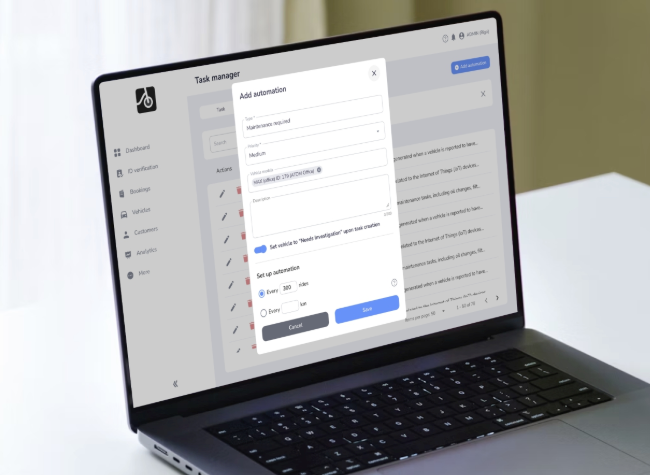
Bad user experiences often happen when several riders encounter the same faulty vehicle. ATOM Mobility now prevents this automatically. Automation rules detect problematic vehicles and instantly set them to “Needs investigation,” hiding them from the user app so the operator can inspect the vehicle before the next rider can take it.
Who it helps
Sharing and rental operators managing medium or large fleets.
How it works
System monitors low ratings, repeated short rides, and user reports. When triggered, it:
- creates a maintenance task
- switches vehicle status
- hides the vehicle from users
Why it matters
- Prevents recurring complaints from the same issue
- Reduces refunds and reputational damage
- Helps maintain a healthier, more reliable fleet
- Automates routine operational checks
10. New integrations (10) – a broader ecosystem for hardware, payments & compliance (all modules)
What was added
2025 brought a wave of new integrations that give operators more flexibility in choosing hardware, payments, charging, and regulatory tools. What was added:
- Ridemovi IoT
- Wave payment gateway
- Linka smart lock support
- 2Hire IoT
- Kuhmute charging stations
- Eskiz.uz OTP service
- Atmos payment gateway
- Chiron API (regulatory)
- Fitrider charging station
- Azericard payment gateway
Why it matters
- Easier entry into markets with local payment or OTP requirements
- More hardware options for scooters, bikes, e-bikes, and cars
- Better compatibility with charging infrastructure
- Reduced integration time when expanding
- Support for regulatory compliance where required
These ten features represent only a small selection of what we delivered this year. In total, our team shipped more than 70 new features, dozens of integrations, and countless small improvements that quietly make the platform faster, more stable, and more enjoyable for operators and end-users every single day. Behind each release is a team focused on one idea: helping entrepreneurs build stronger, more efficient, and more profitable mobility businesses.
And we’re just getting started.
Our 2026 tech pipeline is already packed with ambitious and exciting solutions – from deeper AI-powered automation to smarter fleet intelligence and new tools that will change how operators run mobility services. We’re looking forward to pushing the industry even further together.
This article was originally published by ATOM Mobility.